
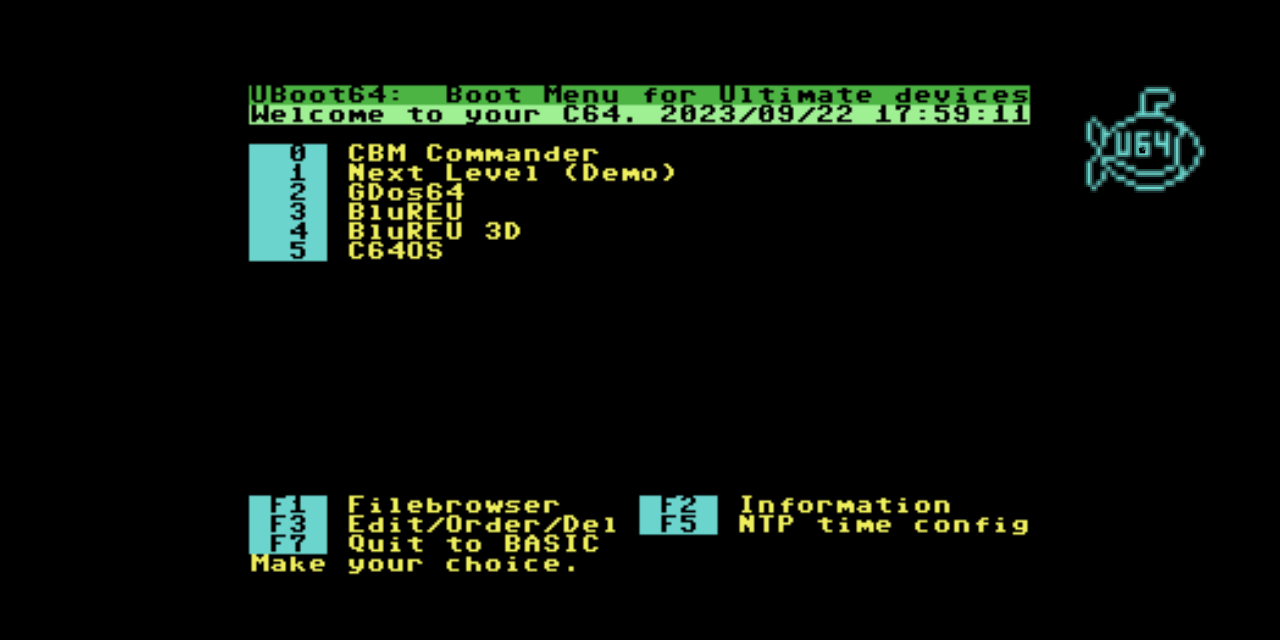
The Commodore 64's power-on experience is iconic: the blue screen, the blinking cursor, READY. — but for anyone who uses a C64 seriously in 2023 and beyond, that blank slate means navigating through menus or typing LOAD commands before any real work can begin. UBoot64 changes that. It is a fully-featured cartridge boot menu purpose-built for C64 machines equipped with an Ultimate II+ cartridge, turning every power-on into a fast, visual launch experience without touching a command line.
Note: UBoot64 v1 is no longer actively supported. Users on firmware 3.12a and later should use UBoot64 v2 instead. This post covers the original version for historical reference.
How It Works
Under the hood, UBoot64 communicates with the UII+ hardware through the Ultimate Command Interface (UCI), the software API that Gideon Zweijtzer's cartridge exposes over the expansion port. The UCI gives the C64's 6502 CPU direct access to the cartridge's USB storage, its emulated disk drives (A and B), and its RAM Expansion Unit — all without the cartridge menu interrupting the running program. UBoot64 exploits this to let you browse the native UII+ filesystem in UCI mode, enter disk images as if they were directories, automatically mount a .D64 or .DNP image on drive A when you select a program, and launch it all from a slot you configured once.
For drives on the IEC serial bus, the IEC mode file browser tracks directory movements with a directory trace mechanism, recording the full path from root so the slot stores a complete, replayable launch sequence.
Menu Slots and Launch Options
Each of the 36 menu slots (0–9 and A–Z) can store a program to run, a disk image for drive A, an optional drive B image, a REU file to preload, and a custom BASIC command to execute before launch. The ,1 Load toggle switches between LOAD"NAME",8 and LOAD"NAME",8,1 for programs that need to load at absolute addresses. Demo mode powers down all UII+ emulated drives except ID 8 before starting — essential for the majority of C64 demos that assume a single active drive.
All configuration is stored to DMBSLT.CFG (slot data) and DMBCFG.CFG (settings) on the root of the first USB drive detected. The edit menu (F3) lets you rename slots, re-order them by pressing cursor keys, or delete entries — all changes saved when you press F7 to return.
NTP Time Synchronisation
A particularly useful feature is the built-in NTP time synchronisation: at boot, UBoot64 connects to pool.ntp.org (configurable) via the UII+ Ethernet interface, converts the received UNIX epoch to your local time zone using a configurable UTC offset in seconds, and sets the UII+ Real Time Clock. No extra software, no manual date entry — just accurate timestamps on saved files every time. The F5 configuration screen lets you toggle NTP on or off, set the server hostname, and dial in your exact UTC offset without recompiling anything.
File Browser
The file browser is derived and extended from DraBrowse by Sascha Bader and Dirk Jagdmann. It operates in two modes switchable with F3. In UCI mode you navigate the native UII+ filesystem, with directory listings rendered directly via the Ultimate Command Interface. In IEC mode you read from physical drives on the serial bus using CBM KERNAL routines, with the directory trace (key D) recording your path from root so the complete location can be stored in a slot. Toggles in the lower-right sidebar show the current mode, whether trace is active, the state of ,1 load, and whether demo mode is enabled.


Installation
UBoot64 is distributed as a .crt cartridge image. Copy it to /Flash/Carts on your UII+ device, then in the Ultimate UI press F2, navigate to C64 and Cartridge Settings, and select uboot64.crt as the auto-start cartridge. Every subsequent power cycle drops you straight into your personalised launch menu. The full source and latest binary are at https://github.com/xahmol/UBoot64.