
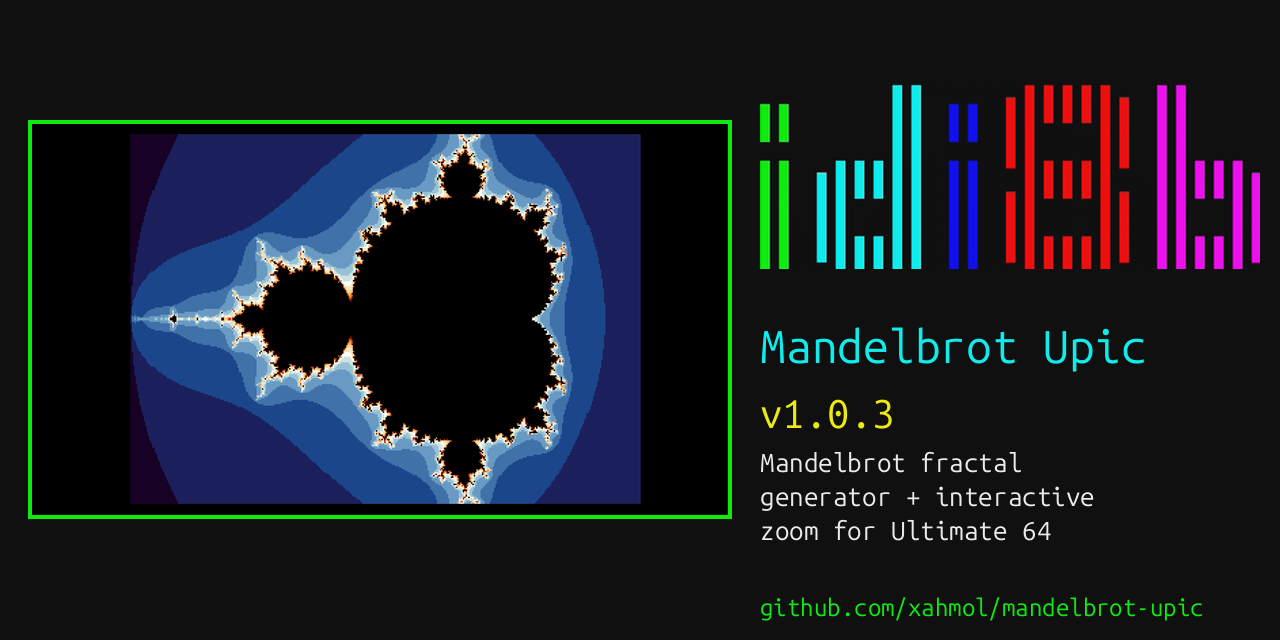
Mandelbrot Upic (now at v1.2.0) is a Mandelbrot fractal generator for the Ultimate 64. The fractal is computed on-device at 64 MHz turbo and displayed live as it builds, using Upic, a border-color raster picture technique giving a full 384x256 picture with independent per-pixel color -- no character-cell color clash. Since v1.1.0 it also runs at 48 MHz on the original Ultimate 64 and the Ultimate 64 Elite; see the v1.1.0 sections below. v1.2.0 makes every pixel exactly one dot wide, adds a choice of live views and saves pictures; see the v1.2.0 sections. Confirmed working on an Ultimate 64 Elite II and an Ultimate 64 Elite, firmware 3.15a.
A Picture Made of Border Flicker
Upic, designed by Aleksi Eeben, does not use any of the VIC-II's bitmap modes at all. With the display enabled bit held low, the whole visible area becomes "border", and the border color register can be changed by the CPU faster than the chip settles into a stable color -- one change per horizontal pixel pair, timed against the raster beam with no slack. render_line_pixels(), the routine doing this, is a single, fully unrolled sequence with no loop at all, since even a loop's own branch overhead would be enough to drift the timing off the beam.
Fixed-Point Fractal Math, No 32KB Table
The escape-time iteration runs entirely in Q5.11 fixed point -- a 16-bit signed value with 11 fractional bits, following the range and precision choice documented by the mandelbr8 project. Their own biggest speed-up is a 16384-entry squaring table, but that alone is 32KB, and this project's picture buffer already takes up most of the machine's RAM. Instead, squaring runs through a 1KB quarter-square multiply table: the identity ab = floor((a+b)^2/4) - floor((a-b)^2/4)* turns a multiply into two table lookups and a subtract, at a fraction of the table-size cost of the direct approach. A closed-form cardioid and period-2-bulb check skips the iteration loop entirely for any point that provably never escapes, which covers a large share of the visible image.
Picking a Region to Zoom Into
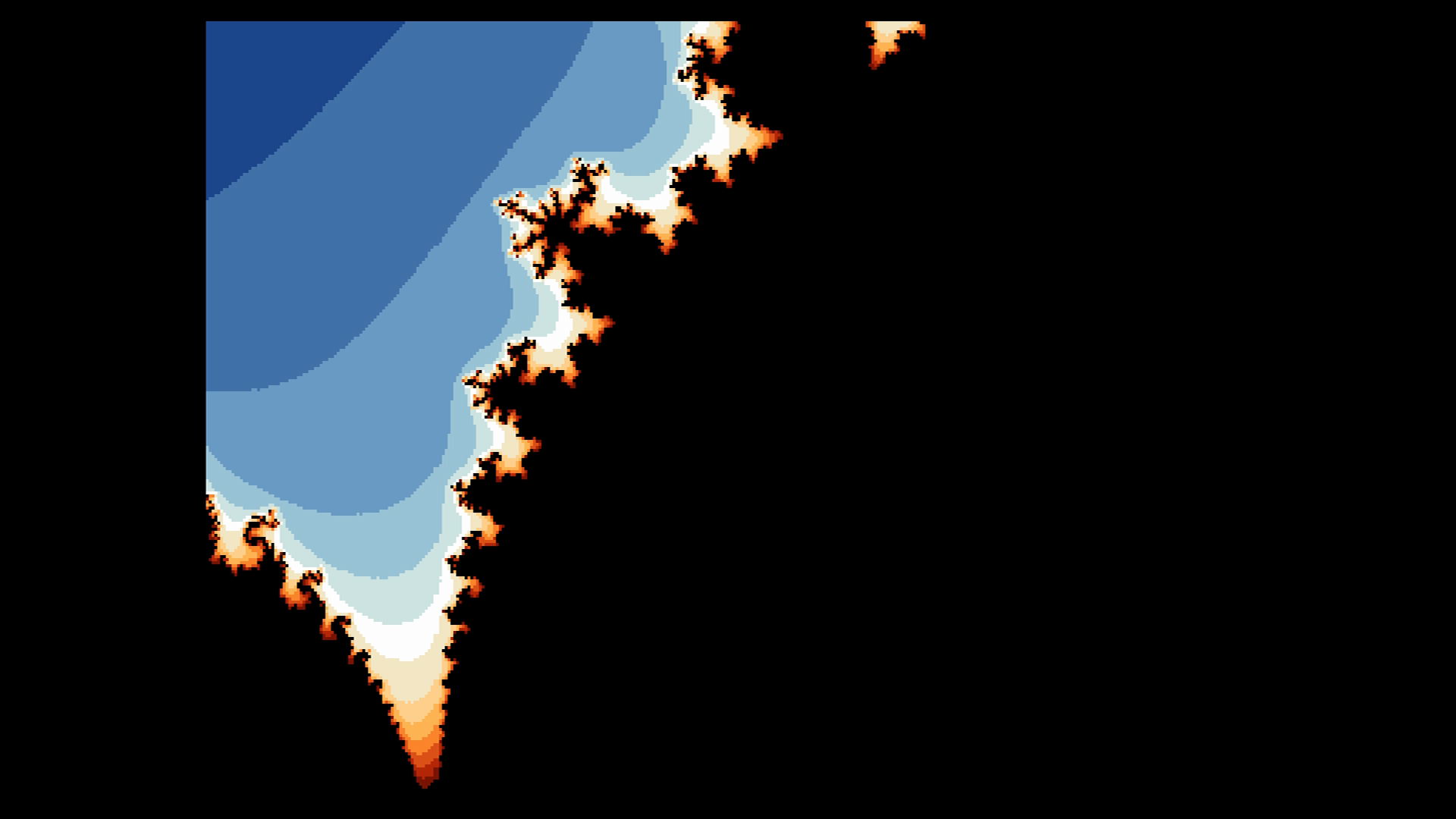
Once generation completes, the current view can be panned, zoomed out gradually toward the original overview, or zoomed into any chosen rectangle: a key opens a movable, resizable selection box with a corner marker at each of its four corners.
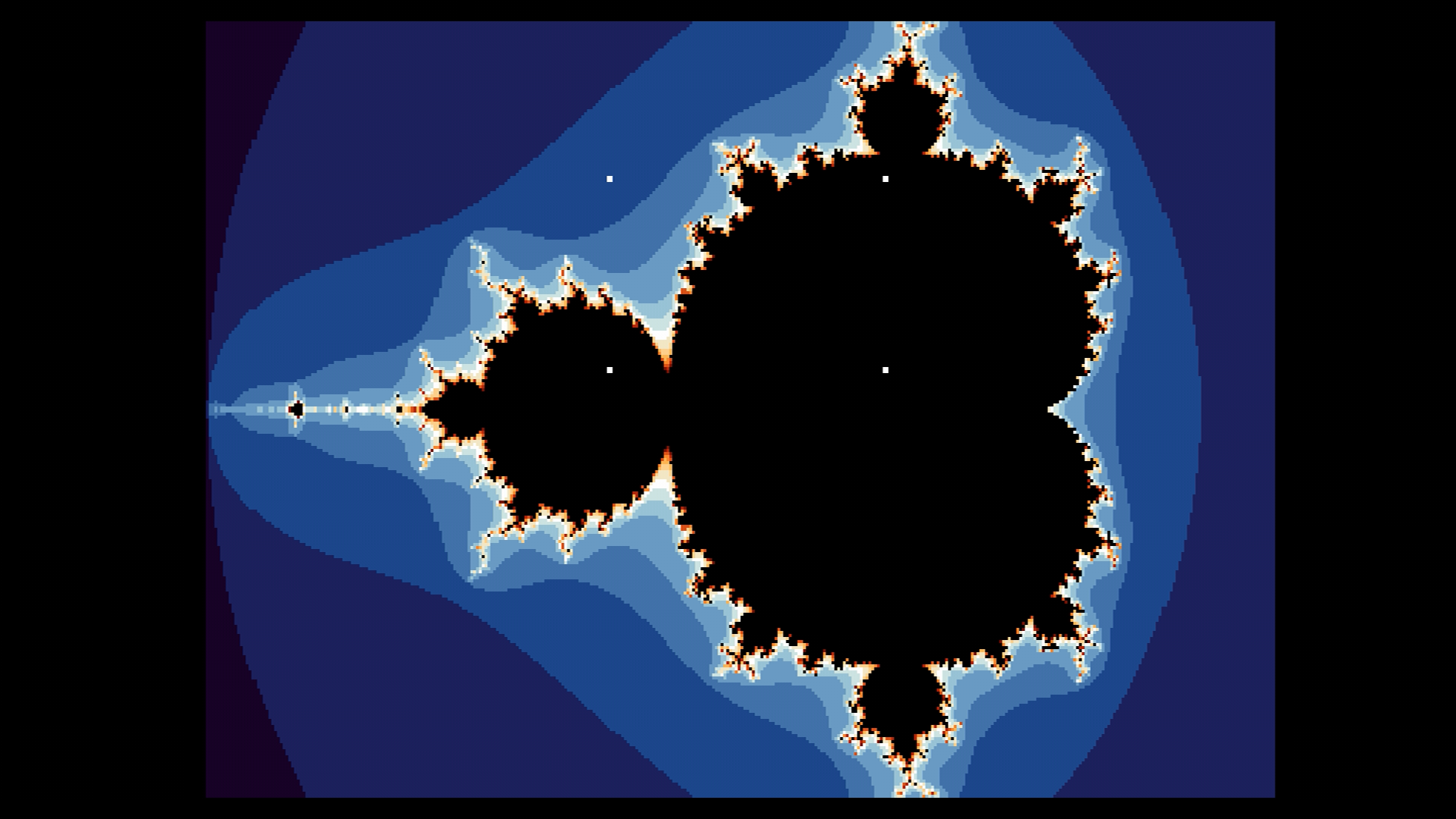
Those markers are drawn directly into the packed picture buffer, not VIC-II hardware sprites. Two isolated standalone tests on real hardware confirmed why: a sprite shows up fine on an ordinary text screen, but the exact same sprite setup, with every register reading back correct, is simply invisible once the border-racing technique is holding the display disabled across the whole frame. That is a different situation from the well-documented "sprites over an open border" trick, which only toggles one register briefly per line rather than holding the display off for an entire multi-frame session.
A Genuine Interrupt Collision
The interactive controls surfaced a real, reproducible crash: pressing any key while browsing or zooming would occasionally drop the display straight to a JiffyDOS text screen. It reproduced even in a build with none of the zoom feature's own code, which ruled out the new controls themselves as the cause. The actual mechanism sits lower down: this project banks ROM out permanently to get enough RAM for the picture buffer, and a trampoline routine keeps that safe by re-banking ROM in whenever a real hardware interrupt fires and handing off to the genuine KERNAL interrupt handler -- otherwise a stray interrupt while ROM is out would jump into whatever happens to sit at the KERNAL's usual addresses instead of real code. That KERNAL handler runs its own keyboard-matrix scan on every timer tick, and this project also scans the same CIA registers directly every frame -- two independent scans of the same hardware, timed independently of each other. The fix was to mask interrupts globally, once, for the program's entire lifetime: nothing in this project actually needs a real interrupt for anything, since even the display's own cycle-exact timing is plain busy-polled rather than interrupt-driven.
v1.0.1: Real-World Feedback and a Palette Rework
Once v1.0.0 was out and other people were pointing it at real Ultimate 64 hardware, three more issues turned up:
A Lemon64 forum thread reported faint noise speckles in the rendered output. DDT (also 0x444454 on GitHub, author of the mandelbr8 project this generator's fixed-point design is credited to above) correctly argued the multiply routine rather than the add/sub steps was the likely cause, backed by their own per-pixel max-magnitude analysis of the default view. The actual bug turned out to be in where Q5.11 values get truncated back to 16 bits inside fixed_sqr()/fixed_mul()'s own return path -- the quarter-square multiply algorithm itself stayed exact throughout.
Separately, real-hardware testing of box mode surfaced two zoom-box off-by-ones (a self-contradictory clamp at the largest box size, and the right/bottom corner markers landing one cell past the box's true edge), plus a left-edge alignment issue where box mode's leftmost corner markers could fall partly off-screen -- traced to the picture's horizontal timing pad and fixed by bisecting to a cycle count that's both safe (no timing skew) and sufficient (all four markers stay on-screen).
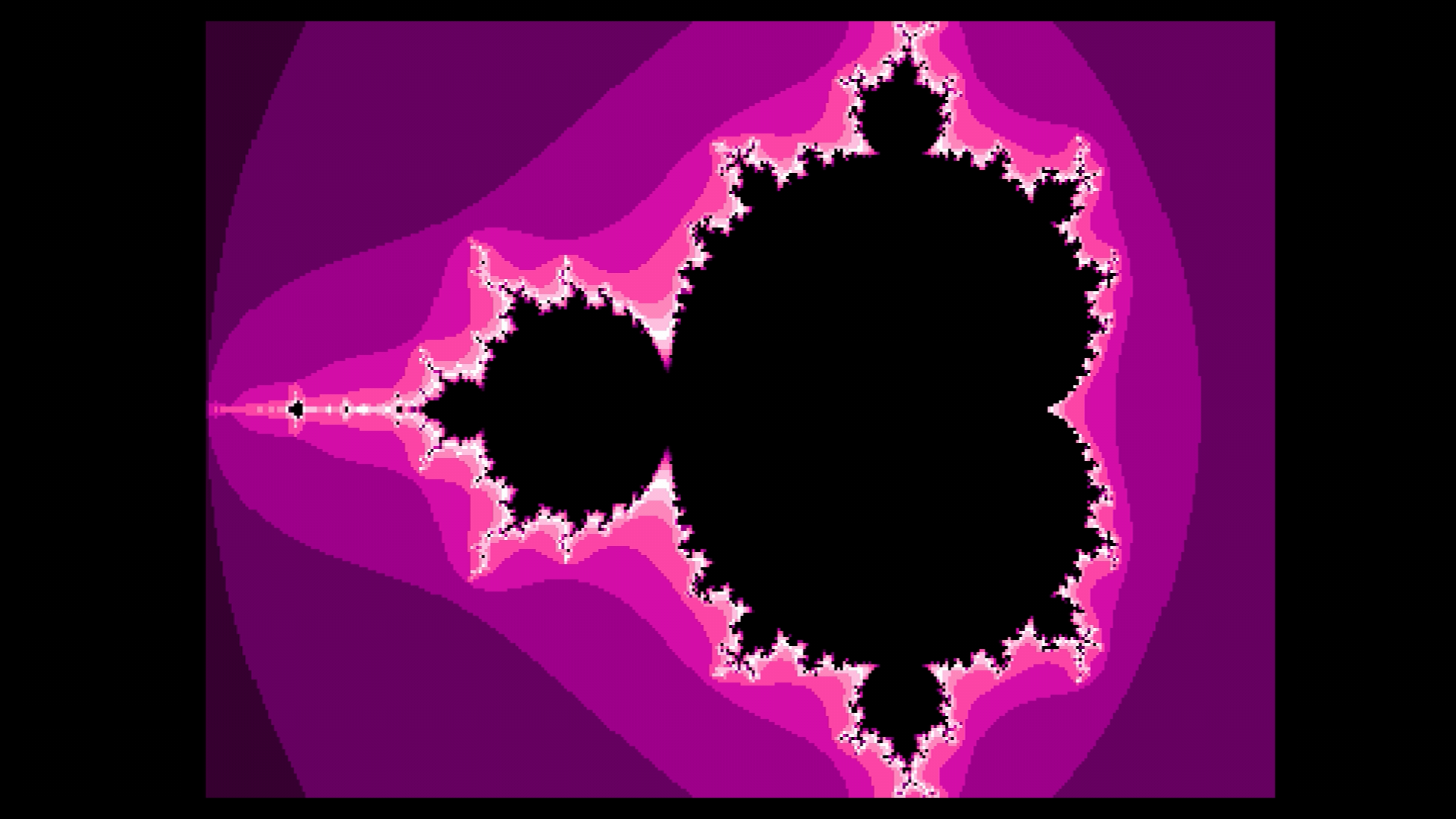
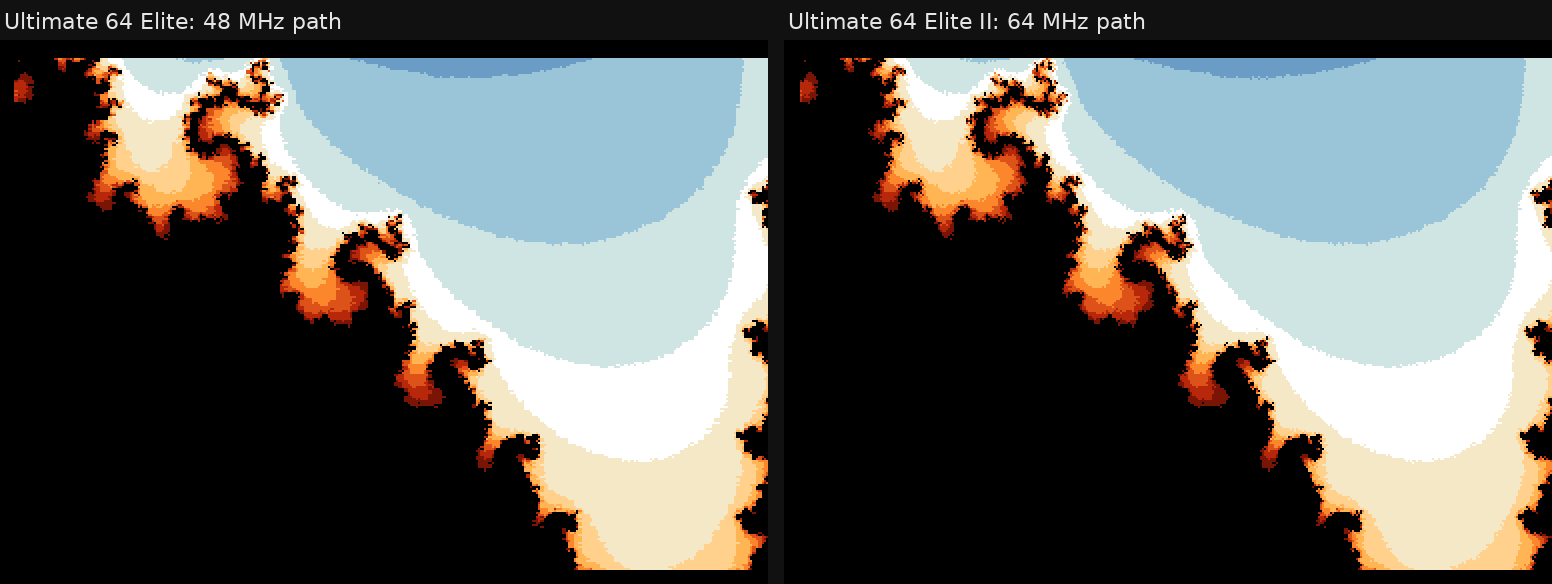
Finally, a forum reader counted only 11 visible shading bands in a screenshot and asked why not 14 -- mapping that screenshot's pixels to nearest palette index confirmed it: a couple of steps sat close enough to black or white to be essentially invisible on screen. Chasing that down surfaced a second problem no one had reported yet: the default and ice palettes turned out to share an almost identical blue ramp across their low-iteration colors, the exact colors dominating the fractal's exterior "lake", so the two looked nearly the same for most of a picture. All four gradients got reworked so every adjacent step is comfortably distinct and no two gradients read alike at the same escape-iteration band; the former "ice" gradient was replaced by Amethyst (black -> deep violet -> vivid magenta -> hot pink -> pale pink).
v1.0.2: A Genuinely Missing Shade
The amethyst image above still wasn't the end of it. DDT looked at v1.0.1's output against their own mandelbr8 reference renders across a dozen different 8-bit platforms and reported something more specific than "adjacent steps too close together": the second-lowest escaping iteration count was sharing a color with the lowest one, when it should have been its own distinct shade. That also retroactively explained the noise-island puzzle from the previous fix -- those isolated stray pixels weren't sitting at a visible color boundary because there wasn't one to sit at; the region they appeared in secretly spanned more than one true iteration count merged into a single color, so only the miscomputed pixels showed any change at all.
The root cause was arithmetic, not aesthetic: 32 possible iteration counts don't divide evenly into 14 palette shades, and the straight-line formula computing which count got which shade (one plus the count times 14, divided by 32) quietly merged three consecutive counts into one shade at four separate points -- and the very first of those four fell on the two lowest, most common counts, the ones covering most of any view's exterior background. Fixed with a small lookup table that front-loads resolution instead: the lowest couple of counts each get an exclusive shade, and the three-counts-per-shade compression only happens up near the iteration cap, in the busy detail band right at the fractal boundary where it's far less noticeable.
v1.0.3: White Was at the Wrong End
One more round followed almost immediately. With white now part of the escaping-iteration gradient, it landed at the highest possible count -- the step immediately bordering the true black interior. That put a stark white-to-black edge everywhere the fractal boundary is, rather than the "brightest a little in from the edge, dimming again right at the boundary" look these gradients were designed around (the default sunset gradient's own pale-sky peak, sitting mid-gradient rather than at either end, already worked this way for exactly that reason).
Moved white to a genuine mid-gradient peak instead, and settled all four gradients on the SAME index for it, so the corner-marker color could stay one constant rather than needing a different value per palette. Fire and amethyst became literal mirrors of their own ascending arc -- a symmetric "hot core cooling to embers" and "gem flash surrounded by deepening violet" respectively. Sunset kept its original asymmetric shape (a different arc going up than coming down), since mirroring would have erased its gold-orange-red half entirely. Rainbow's original "white cap" -- planned from the very first version of this palette, just never reachable until the previous round -- became a mid-cycle flash, splitting its 14 fully-saturated hues into two arcs of 7 either side of it.
This is being treated as the last iteration on this particular thread. It's closer to DDT's own mandelbr8 output than any previous version, though not a byte-for-byte match -- further chasing that gap ran into diminishing returns weighed against the effort involved.
v1.1.0: Running at 48 MHz
Up to v1.0.3 the demo needed an Ultimate 64 Elite II. The original Ultimate 64 and the Ultimate 64 Elite top out at 48 MHz, and that is not enough for the border-racing line routine: once the VIC-II's share of each cycle is taken out, 48 MHz leaves 2,961 CPU cycles per PAL line, while the unchanged routine needs 3,072 cycles for its border color writes alone.
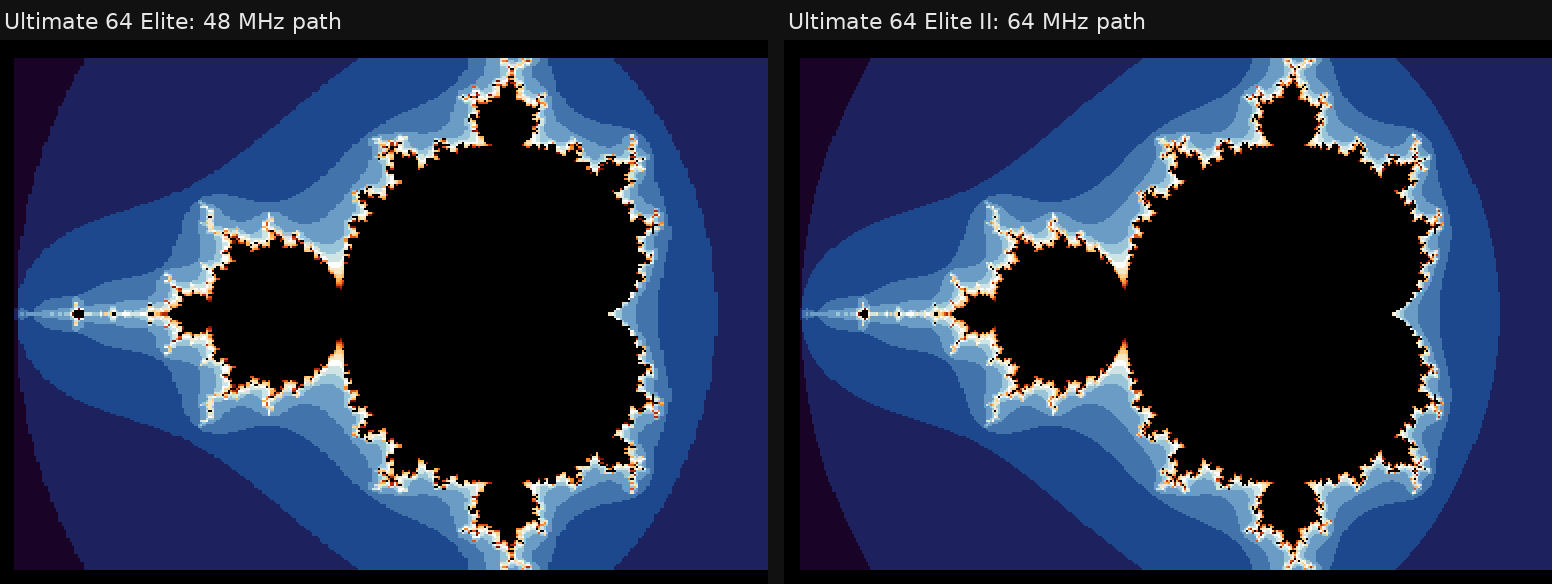
v1.1.0 adds a 48 MHz path, contributed by Christian Gleissner in pull request #2. It keeps the picture format and its size on screen, and draws fewer pixels: on a 48 MHz machine the line routine is rebuilt in place at startup to show 3 of every 4 pixels, using a load and a store per pixel, 8 cycles each. That gives 288 of the 384 pixels per line, each about 1.36 dots wide, and every pixel shown lands within 1.5 dots of where the 64 MHz path shows it. On a 64 MHz machine nothing is patched, and the render code is the same as in v1.0.3.
The program picks the path by itself. At startup it times a fixed loop against the raster counter: about 16 raster lines at 64 MHz, about 22 at 48 MHz. The Ultimate 64 runs the CPU at 1 MHz for a few seconds after every reset, so the probe ignores results from that window and only accepts a speed that two loops in a row agree on. If turbo cannot be switched on at all, it gives up after about 20 seconds instead of waiting on a black screen.
The first version of the 48 MHz path failed on hardware: every picture row landed two raster lines apart. It used an indexed store into the VIC-II's border register, and an indexed store on the NMOS 6502 first does a dummy read of its target address. On the Ultimate 64 that read of a VIC-II register costs the CPU an extra slot, so each pixel took one cycle more than on paper. The final version makes no indexed access to I/O space at all.
v1.1.0: A Start-Up Hang
While testing, Christian found that programs started over the Ultimate's network interface hung before the first picture in 6 of 15 starts on his Elite -- the unmodified v1.0.3 included. The cause was in this project's library for the Ultimate's Command Interface: it always sent the firmware 3.15 unlock sequence, even when the interface was already active, which could leave the command handshake in a state the library never left. The library now only unlocks when needed, and two smaller register handling errors are corrected as well. Afterwards, 30 starts on the Elite and 20 on a C64 Ultimate showed no hangs.
v1.1.0: Tests on Real Hardware
Until now, testing this demo meant watching the screen. Firmware 3.15 changed that: the Ultimate can inject keyboard and joystick input over its network interface and stream the VIC-II video output to a PC. Christian's pull request uses both.
make test runs the compiled renderer, the 48 MHz rebuild and the speed probe in a small cycle-counting 6502 emulator, against a model of the Ultimate 64's turbo timing -- 22 tests, no hardware needed. make e2e starts the demo on one or more real devices, presses keys through overview, box mode, zoom and pan, captures the video stream, waits for 8 identical frames, and compares each capture pixel for pixel with stored reference images. It finishes with a stripe pattern that maps which pixel ends up on which screen position, and checks that the 48 MHz pictures show the same thing as the 64 MHz ones. For v1.1.0 it passed on an Ultimate 64 Elite II and an Ultimate 64 Elite side by side, in about two and a half minutes.
v1.1.1: One Config File for All
The release zip contains mandelupic.cfg next to mandelupic.prg. The Ultimate firmware loads a configuration file automatically when it has exactly the program's name, which switches on the turbo registers and the Command Interface. The turbo setting, however, has a different value name per product: U64 Turbo Registers on the Ultimate 64 family, C64U Turbo Registers on the C64 Ultimate. Two files side by side do not work, since only the one with the program's own name is loaded.
v1.1.1 therefore lists the turbo setting twice, once with each name. The firmware skips the value it does not know and applies the rest of the file, without any message when the file is loaded automatically. On an Elite II, with the turbo setting switched off beforehand, the file set it to U64 Turbo Registers and the demo ran at full speed. Whether a C64 Ultimate behaves the same way still has to be confirmed.
The C64 Ultimate itself is not supported yet: the demo sets its colors through the Command Interface's palette commands, and the C64 Ultimate firmware release that adds them (expected to be 1.2) is not out yet. Christian already ran the same PRG on a 1.2 release candidate.
v1.2.0: Exactly One Dot per Pixel
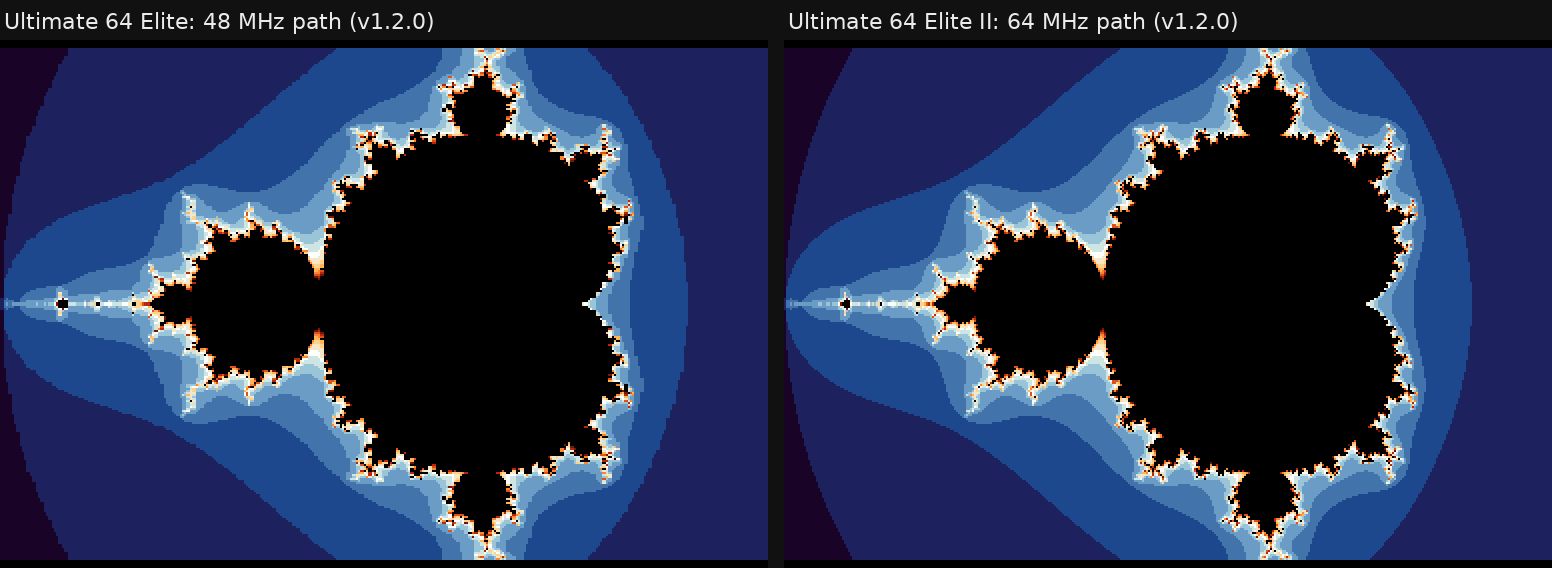
Up to v1.1.1 the pixels were very slightly too wide. At 64 MHz the CPU gets 63 cycles for every 8 dots of the raster beam, so a pixel written every 8 cycles is 64/63 of a dot wide. Over 384 pixels that adds up: the picture started 8 dots in, and pixels 370 to 383 fell beyond the right edge of the visible area (compare the 64 MHz picture in the v1.1.0 image above).
Aleksi Eeben, who created Upic, shared the source of his Upic v1.3 display routine, which solves this. Every 8th pixel pair is loaded from an immediate operand instead of from memory, and a short routine patches those operands with the current row's bytes before each line. That saves 2 cycles per 16 pixels: 16 pixels then take 126 cycles, exactly 16 dots. The 48 MHz path gets the same treatment with every 4th group patched: 94 cycles per 16 pixels, again exactly 16 dots. Both paths now start on the first visible dot, fill all 384 dots, and put every pixel on the same position.
The line routine is now generated at startup rather than written out in full, so it adapts to the memory layout and the measured CPU speed. One more detail turned up on the hardware: the routine needed two extra NOP instructions before switching the rest of the line to black, otherwise the last pixel was overwritten before it reached the screen.
v1.2.0: Choosing What You See While It Computes
The live build-up of earlier versions has a cost: the program draws a frame of the picture after every column it computes, and while it draws, it does not compute. The picture is shown in about a quarter of all frames, so it flickers, and a good part of the time goes to showing it.
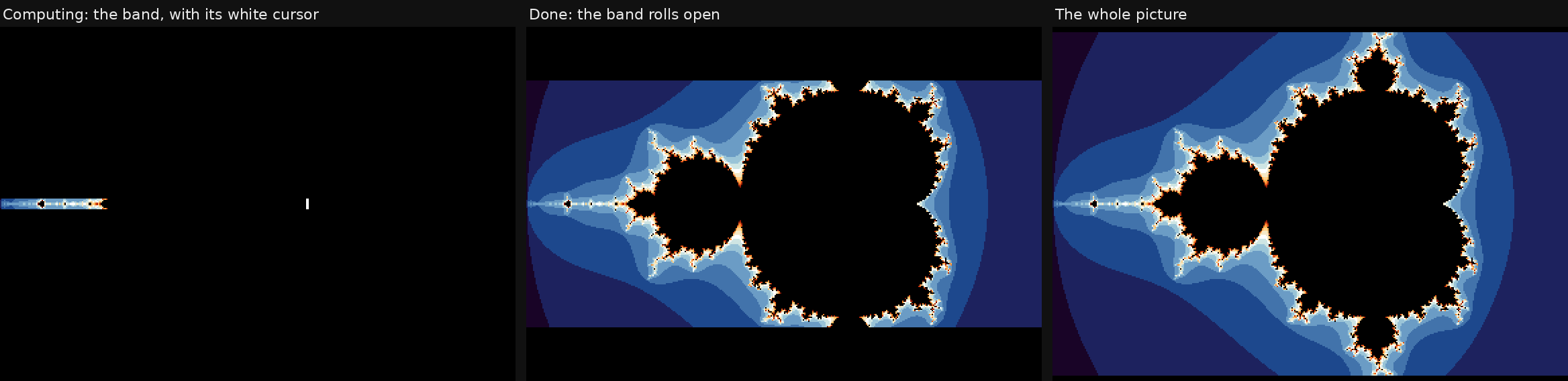
Aleksi suggested another way: show only a few lines of the picture from a raster interrupt while it is computed, as a progress bar, and the whole picture once it is done. v1.2.0 offers three live views, switched with V at any time, also while a picture is being computed:
- Bar, the new default: an 8-line band through the middle of the picture fills from left to right, with a white cursor at its front edge, so its progress shows even where the picture is black. Drawing 8 lines costs only a few percent of the CPU. When the picture is done, the band rolls open to the whole picture.
- Classic: the flickering build-up of earlier versions.
- Full: the whole picture, steady, from the raster interrupt. It looks best, but the display then takes 256 of every 312 raster lines, so computing is much slower.
| Live view | Elite II (64 MHz) | Elite (48 MHz) |
|---|---|---|
| Bar | 6.9 s | 9.3 s |
| Classic | 11.2 s | 15.1 s |
| Full | 38.8 s | 52 s |
The times are for the default overview, measured with the CIA clock. This is the first time the program uses an interrupt at all (see the section on the interrupt collision above). It does so only while computing, with its own interrupt vectors, the ROMs banked out and the CIA timer interrupts switched off, so no interrupt can reach the KERNAL; interrupts are masked again before the keyboard is read in browse mode.
v1.2.0: Saving Pictures
F1 saves the picture on screen as MANDEL01.UPIC, MANDEL02.UPIC and so on, without the zoom box markers. The file is in Aleksi's Upic v1.3 format: a 256-byte header with the palette, four lines of text (here the program version, the view coordinates and a "Created with" line) and a few settings, followed by the 49,152-byte picture. His Upic tools, including the upcoming Upic Paint, can open it. The file is written through the Ultimate's Command Interface, straight from the picture memory, without a buffer.
v1.2.0: Upic in the Ultimate Library
The Upic display is no longer part of this program's own code: it is now a module of my Ultimate library for the Oscar64 compiler, ultimate-uci-oscar64 v1.3.0, so other programs can use it as well. The module contains the display for both speeds, Aleksi's raster-interrupt viewer with an adjustable window of lines, his drawing routines (plot, read a pixel, clear, text and hex digits) and loading and saving of .upic files. Aleksi allowed his code to be published there, and the module credits him.
v1.2.0: Recording the Video
The new video was not filmed: it was captured directly from the Ultimate's video stream, with the key presses sent over the network by a script, so every pixel in it is exactly what the C64 drew. One thing showed up only in the recording: every memory read over the Ultimate's network interface briefly stops the C64 CPU, and if that happens while the picture is being drawn, the rest of that frame is shifted by a line. The recording script therefore reads memory as little as possible, and the few remaining frames were repaired afterwards.
Watch It In Action
v1.2.0 on an Ultimate 64 Elite II, captured from the video stream: the three live views, the four gradients, zooming in to the maximum and saving:
Mandelbrot Upic v1.2.0 - the Mandelbrot set computed live on a Commodore 64 at 64 MHz
The earlier recording of v1.0, generation through to interactive zoom: Ultimate 64: Mandelbrot Upic - Live Fractal Generation & Interactive Zoom
v1.2.0 Is Available Now
v1.2.0 is the current release, also available from the Files section of this site: on-device generation with exact pixel width at 64 and 48 MHz, three live views, the four-corner zoom box, gradual zoom-out, four selectable colour gradients (sunset, fire, amethyst, rainbow), saving as .upic, and every fix described above. It requires firmware 3.15 or newer on an Ultimate 64, Ultimate 64 Elite or Ultimate 64 Elite II. The release zip bundles the configuration file that switches on the Command Interface and turbo registers automatically. After a few seconds of start-up, the first picture takes about 7 seconds on an Elite II and about 9 on an Elite.
Credits
- Code: Xander Mol
- 48 MHz display path, speed probe, start-up hang fix and automated tests: Christian Gleissner
- Upic border-color raster technique, display and drawing code, .upic file format, and the idea for the Bar live view: Aleksi Eeben
- Fixed-point algorithm design: inspired by 0x444454's mandelbr8 project (documented approach only; no code from that project is used)
- Noise-speckle overflow bug, missing color shade, and coloring-scheme approach: all from DDT (0x444454) on Lemon64, comparing against their own mandelbr8 reference renders
- Compiler: Oscar64 by drmortalwombat
- Ultimate 64 hardware: designed by Gideon Zweijtzer / Gideon's Logic
Licensed under the GNU General Public License v3.0.
Sources and More Information
mandelbrot-upic repository -- source code, full documentation, and the release: github.com/xahmol/mandelbrot-upic
mandelbr8 -- the project whose documented algorithm design this generator's fixed-point approach is based on: github.com/0x444454/mandelbr8
Oscar64 compiler -- C99/C++ cross-compiler for 6502, by drmortalwombat: github.com/drmortalwombat/oscar64
Upic -- Aleksi Eeben's border-colour picture format and tools: csdb.dk/release/?id=263889
ultimate-uci-oscar64 -- the Ultimate library with the Upic module, and its manual: github.com/xahmol/ultimate-uci-oscar64, docs/UPIC_MANUAL.md
Pull request #2 -- Christian Gleissner's 48 MHz work, with a detailed write-up and side-by-side captures: github.com/xahmol/mandelbrot-upic/pull/2
Display technique and 48 MHz path -- the project's own documentation of Upic and the turbo timing: docs/UPIC_VIEWER.md
End-to-end test -- how the hardware test works, and how to run it, including from WSL2: tests/e2e/README.md
c64bridge -- Christian Gleissner's MCP server for controlling Ultimate hardware and VICE: github.com/chrisgleissner/c64bridge
1541 Ultimate firmware -- the firmware behind the Ultimate 64, including the 3.15 input and streaming features: github.com/GideonZ/1541ultimate
Ultimate 64 hardware -- product page for the FPGA-based C64 mainboard this project targets: ultimate64.com